orthrus.core namespace
Submodules
orthrus.core.dataset module
This module contains the main DataSet class used for all preprocessing, visualization, feature selection, and classification.
-
class
orthrus.core.dataset.DataSet(name: str = '', description: str = '', path: str = '.', data: pandas.core.frame.DataFrame = Empty DataFrame Columns: [] Index: [], metadata: pandas.core.frame.DataFrame = Empty DataFrame Columns: [] Index: [], vardata: pandas.core.frame.DataFrame = None, dissimilarity_matrix: pandas.core.frame.DataFrame = None, normalization_method: str = '', imputation_method: str = '')¶ Bases:
objectPrimary base class for storing data and metadata for a generic dataset. Contains methods for quick data pre-processing, visualization, and classification.
- Parameters
name (str) – Reference name for the dataset. Default is the empty string.
description (str) – Short description of data set.
path (str) – File path for saving DataSet instance and related outputs. Default is the empty string.
data (pandas.DataFrame) – Numerical data or features of the data set arranged as samples x features. Default is the empty DataFrame.
metadata (pandas.DataFrame) – Categorical data or attributes of the dataset arranged as samples x attributes. The sample labels in the index column should be the same format as those used for the data DataFrame. If labels are missing or there are more labels than in the data, the class will automatically restrict to just those samples used in the data and fill in NaN where there are missing samples. Default is the empty DataFrame.
vardata (pandas.DataFrame) – Categorical data or attributes of the features on the dataset arranged as features x attributes. The feature labels in the index column should be the same format as those used for the columns in the data DataFrame. Default is None.
dissimilarity_matrix (pandas.DataFrame) – Symmetric matrix whose columns and index are given by the samples. Its contents give the pairwise dissimilarities between the samples. Default is None.
normalization_method (str) – Label indicating the normalization used on the data. Future normalization will append as normalization_1/normalization_2/…/normalization_n indicating the sequence of normalizations used on the data. Default is the empty string.
imputation_method (str) – Label indicating the imputation used on the data. Default is the empty string.
-
name¶ Reference name for the dataset. Default is the empty string.
- Type
str
-
description¶ Short description of data set.
- Type
str
-
path¶ File path for saving DataSet instance and related outputs. Default is the empty string.
- Type
str
-
data¶ Numerical data or features of the data set arranged as samples x features. Default is the empty DataFrame.
- Type
pandas.DataFrame
-
metadata¶ Categorical data or attributes of the dataset arranged as samples x attributes. The sample labels in the index column should be the same format as those used for the data DataFrame. If labels are missing or there are more labels than in the data, the class will automatically restrict to just those samples used in the data and fill in NaN where there are missing samples. Default is the empty DataFrame.
- Type
pandas.DataFrame
-
vardata¶ Categorical data or attributes of the features on the dataset arranged as features x attributes. The feature labels in the index column should be the same format as those used for the columns in the data DataFrame. Default is None.
- Type
pandas.DataFrame
-
dissimilarity_matrix¶ Symmetric matrix whose columns and index are given by the samples. Its contents give the pairwise dissimilarities between the samples. Default is None.
- Type
pandas.DataFrame
-
normalization_method¶ Label indicating the normalization used on the data. Future normalization will append as normalization_1/normalization_2/…/normalization_n indicating the sequence of normalizations used on the data. Default is the empty string.
- Type
str
-
imputation_method¶ Label indicating the imputation used on the data. Default is the empty string.
- Type
str
-
n_samples¶ The number of samples in the dataset.
- Type
int
-
n_features¶ The number of features in the dataset.
- Type
int
-
experiments¶ Holds experimental results. e.g. from
DataSet.classify().- Type
dict
Examples
>>> from pydataset import data as pydat
>>> from orthrus.core.dataset import DataSet as DS
>>> df = pydat('iris')
>>> data = df[['Sepal.Length', 'Sepal.Width', 'Petal.Length', 'Petal.Width']]
>>> metadata = df[['Species']]
>>> ds = DS(name='Iris', data=data, metadata=metadata)
-
autosummarize(which='metadata', use_dash=False, **kwargs)¶ This method gives a human-readable output of summary statistics for the data/metadata/vardata. It includes basic statistics such as mean, median, mode, etc. and gives value counts for discrete data attributes. When using dash am interactive dashboard will be created. The user will then be able to view histograms for each attribute in the metadata along with basic summary statistics. The user can interact with the dashboard to adjust the number of bins and attribute.
- Parameters
which (str) – String indicating which data to use. Choices are ‘data’, ‘metadata’, or ‘vardata’. Default is ‘metadata’.
use_dash (bool) – Flag for indicating whether or not to use dash dashboard. Default is False.
**kwargs (dict) – Passed directly to dash.Dash.app.run_server for configuring host server. See dash documentation for further details.
- Returns
inplace method.
Examples
>>> from pydataset import data as pydat
>>> from orthrus.core.dataset import DataSet as DS
>>> df = pydat('iris')
>>> data = df[['Sepal.Length', 'Sepal.Width', 'Petal.Length', 'Petal.Width']]
>>> metadata = df[['Species']]
>>> ds = DS(name='Iris', data=data, metadata=metadata)
>>> ds.autosummarize(use_dash=True, port=8787)
-
classify(classifier, attr: str, classifier_name=None, fit_args: dict = {}, predict_args: dict = {}, feature_ids=None, sample_ids=None, partitioner=None, partitioner_name=None, scorer=None, scorer_args: dict = {}, scorer_name=None, split_handle: str = 'split', fit_handle: str = 'fit', predict_handle: str = 'predict', f_weights_handle: str = None, s_weights_handle: str = None, append_to_meta: bool = True, inplace: bool = False, f_rnk_func=None, s_rnk_func=None, training_transform=None, experiment_name=None, verbose: bool = True, **kwargs)¶ This method runs a classification experiment. The user provides a classifier, a class to partition the data into train/test partitions, and a scoring method. The experiment returns the fit classifiers across the train/test partitions, the train/test scores. Additionally, the experiment will either return, or append depending on the
appendflag, the prediction labels, the training and testing labels, feature/sample weights associated to the fit classifiers, and their associated rankings.- Parameters
classifier (object) – Classifier to run the classification experiment with; must have the sklearn equivalent of a
fitandpredictmethod.fit_args (dict) – Keyword arguments passed to the classifiers fit method.
predict_args (dict) – Keyword arguments passed to the classifers predict method
attr (string) – Name of metadata attribute to classify on.
classifier_name (string) – Common name of classifier to be used for identification. Default is
classifier.__str__().feature_ids (list-like) – List of indicators for the features to use. e.g. [1,3], [True, False, True], [‘gene1’, ‘gene3’], etc…, can also be pandas series or numpy array. Defaults to use all features.
sample_ids (like-like) – List of indicators for the samples to use. e.g. [1,3], [True, False, True], [‘human1’, ‘human3’], etc…, can also be pandas series or numpy array. Defaults to use all samples.
partitioner (object) – Option 1.) Class-instance which partitions samples in batches of training and test split. This instance must have the sklearn equivalent of a split method. The split method returns a list of train-test partitions; one for each fold in the experiment. See sklearn.model_selection.KFold for an example partitioner. Option 2.) Tuple of training and test ids. The default is None; resulting in using all of the samples to train the classifier with no test samples.
partitioner_name (string) – Common name for the
partitionerto be used for identification. Default ispartitioner.__str__().scorer (object) – Function which scores the prediction labels on training and test partitions. This function should accept two arguments: truth labels and prediction labels. This function should output a score between 0 and 1 which can be thought of as an accuracy measure. See sklearn.metrics.balanced_accuracy_score for an example.
scorer_args (dict) – Keyword argumunts passed to the scoring function used.
scorer_name (string) – Common name of scorer to used for identification. Default is
scorer.__str__().split_handle (string) – Name of
splitmethod used bypartitioner. Default is “split”.fit_handle (string) – Name of
fitmethod used byclassifier. Default is “fit”.predict_handle (string) – Name of
predictmethod used byclassifier. Default ispredict.f_weights_handle (string) – Name of
classifierattribute containing feature weights. Default is None.s_weights_handle (string) – Name of
classifierattribute containing sample weights. Default is None.append_to_meta (bool) – If
True, the classification results will be appended to
:param
DataSet.metadataandDataSet.vardata. Default isFalse.: :param inplace: If True the classification results will be stored toDataSet.experiments.If
Falsethe classification results will be returned to the user. Default isFalse- Parameters
f_rnk_func (object) – Function to be applied to feature weights for feature ranking. Default is None, and the features will be ranked from greatest to least importance. e.g. rank = 1 most important.
s_rnk_func (object) – Function to be applied to sample weights for sample ranking. Default is None, and the samples will be ranked in from least to greatest.
training_transform (object) – Transformer to be fit on training partitions and applied to both training and test data. For example fit a StandardScalar transform to the training data and apply the learned affine transform to the training and test data. This is useful for on the fly normalization. The default is None.
experiment_name (string) – Common name of experiment to use when
inplace=Trueand storing results intoDataSet.experiments. Default isattr+classifier_name+partitioner_name+scorer_name.verbose (boolean) – If True, logs will be printed to console. Default = True
- Returns
- (classifiers) - Contains the fit classifiers. (scores) - Contains the training and test scores
provided by
scoreracross partitions given bypartitioner. (prediction_results) - Contains the prediction labels and train/test labels across each fold generated bypartitioner. (f_weights) - Contains the feature weights and rankings in the classification experiment for each fold generated bypartitioner. (s_weights) - Contains the sample weights and rankings in the classification experiment for each fold generated bypartitioner.
- Return type
dict
Examples
>>> # imports
>>> import orthrus.core.dataset as dataset
>>> from orthrus.sparse.classifiers.svm import SSVMClassifier as SSVM
>>> from calcom.solvers import LPPrimalDualPy
>>> from sklearn.model_selection import KFold
>>> from sklearn.metrics import balanced_accuracy_score as bsr
...
>>> # load dataset
>>> ds = dataset.load_dataset('./test_data/GSE161731_tmm_log2.ds')
...
>>> # setup classification experiment
>>> ssvm = SSVM(solver=LPPrimalDualPy, use_cuda=True)
>>> kfold = KFold(n_splits=5, shuffle=True, random_state=0)
>>> covid_healthy = ds.metadata['cohort'].isin(['COVID-19', 'healthy'])
...
>>> # run classification
>>> ds.classify(classifier=ssvm,
...             classifier_name='SSVM',
...             attr='cohort',
...             sample_ids=covid_healthy,
...             partitioner=kfold,
...             partitioner_name='5-fold',
...             scorer=bsr,
...             scorer_name='bsr',
...             f_weights_handle='weights_',
...             append_to_meta=True,
...             inplace=True,
...             experiment_name='covid_vs_healthy_SSVM_5-fold',
...             f_rnk_func=np.abs)
...
>>> # share the results
>>> ds.save('./test_data/GSE161731_ssvm_results.ds')
-
feature_select(selector, attr: str, cross_attr: str = None, selector_name=None, feature_ids=None, sample_ids=None, fit_handle: str = 'fit', f_results_handle: str = 'results_', append_to_meta: bool = True, inplace: bool = False, training_transform=None, experiment_name=None)¶ This method runs a feature selection experiment. The user provides a feature selector and a ranking function. The experiment returns, or appends depending on the
appendflag, the feature weights, and their associated rankings.- Parameters
selector (object) – Feature selector to run the feature selection experiment with; must have the sklearn equivalent of a
fitmethod.attr (string) – Name of metadata attribute to feature select on.
cross_attr (string) – (Optional) Name of metadata cross attribute to feature select on. The
fitmethod of theselectormust accept these cross labels.selector_name (string) – Common name of feature selector to be used for identification. Default is
selector.__str__().feature_ids (list-like) – List of indicators for the features to use. e.g. [1,3], [True, False, True], [‘gene1’, ‘gene3’], etc…, can also be pandas series or numpy array. Defaults to use all features.
sample_ids (like-like) – List of indicators for the samples to use. e.g. [1,3], [True, False, True], [‘human1’, ‘human3’], etc…, can also be pandas series or numpy array. Defaults to use all samples.
fit_handle (string) – Name of
fitmethod used byselector. Default is “fit”.f_results_handle (string) – Name of
selectorattribute containing feature results e.g. weights, ranks, etc.The attribute should be array-like with rows corresponding to the features. Default is “results_”.append_to_meta (bool) – If
True, the feature selection results will be appended toDataSet.metadataandDataSet.vardata. Default isFalse.inplace (bool) – If True the feature selection results will be stored to
DataSet.experiments. IfFalsethe feature selection results will be returned to the user. Default isFalsetraining_transform (object) – Transformer to be fit on training partitions and applied to both training and test data. For example fit a StandardScalar transform to the training data and apply the learned affine transform to the training and test data. This is useful for on the fly normalization. The default is None.
experiment_name (string) – Common name of experiment to use when
inplace=Trueand storing results intoDataSet.experiments. Default isattr``+ ``selector_name.
- Returns
(selector) - Contains the fit feature selector. (f_weights) - Contains the feature weights and rankings in the feature selection experiment.
- Return type
dict
Examples
>>> # imports
>>> import numpy as np
>>> import orthrus.core.dataset as dataset
>>> from orthrus.sparse.classifiers.svm import SSVMClassifier as SSVM
>>> from calcom.solvers import LPPrimalDualPy
>>> from orthrus.sparse.feature_selection.kffs import KFFS
...
>>> # load dataset
>>> ds = dataset.load_dataset('./test_data/GSE161731_tmm_log2.ds')
...
>>> # setup classification experiment
>>> ssvm = SSVM(solver=LPPrimalDualPy, use_cuda=True)
>>> kffs = KFFS(k=5,
...             n=5,
...             classifier=ssvm,
...             f_weights_handle = 'weights_',
...             f_rnk_func=np.abs,
...             random_state=0)
...
>>> covid_healthy = ds.metadata['cohort'].isin(['COVID-19', 'healthy'])
...
>>> # run classification
>>> ds.feature_select(selector=kffs,
...             selector_name='kFFS',
...             attr='cohort',
...             sample_ids=covid_healthy,
...             f_results_handle='results_',
...             append_to_meta=True,
...             inplace=True,
...             experiment_name='covid_vs_healthy_SSVM_kFFS')
-
generate_attr_from_queries(attrname: str, queries: dict, attr_exist_mode: str = 'err', which: str = 'metadata')¶ This function creates or updates an attribute in the metadata or vardata. New values for the attribute are provided by the queries, which is a dictionary. For each value in the queries dictionary, indices are extracted using the query method on the dataframe and the key is used as new value at these indices. Any index which is not covered by any of the query is set to pandas.NA :param attrname: Name of the new attribute :type attrname: str :param queries: key: label for the new attribute at the filtered indices, value: query string to filter the indices :type queries: dict :param attr_exist_mode: ‘err’ : raises an Exception if the attribute already exists in the dataframe
‘overwrite’ : overwrites the previous values with new values ‘append’ : updates and appends “_x” the attribute name, where x is an integer based on existing attributes names. Ex. if ‘response’, ‘response_new’, ‘response_1’ is already present, the new name for the attribute will be ‘response_2’
- Parameters
which (str) – String indicating which data to use. Choices are ‘metadata’ or ‘vardata’. Default is ‘metadata’.
- Returns
inplace method
Examples
>>> q_res = "Tissue=='Liver' and response_new=='resistant' and partition in ['training', 'validation']"
>>> q_tol = "Tissue=='Liver' and response_new=='tolerant' and partition in ['training', 'validation']
>>> attribute_name = 'Response'
>>> qs = {'Resistant' : q_res, 'Tolerant': q_tol}
>>> ds.generate_attr_from_queries(attribute_name, qs, attr_exist_mode='append')
-
impute(imputer, feature_ids=None, sample_ids=None, impute_name: str = None)¶ Imputes the data of the dataset according to an imputer class. Appends the imputation method used to
DataSet.imputation_method.- Parameters
imputer (object) – Class instance which must contain the method fit_transform. The output of imputer.fit_transform(
DataSet.data) must have the same number of columns asDataSet.data.feature_ids (list-like) – List of indicators for the features to use. e.g. [1,3], [True, False, True], [‘gene1’, ‘gene3’], etc…, can also be pandas series or numpy array. Defaults to use all features.
sample_ids (like-like) – List of indicators for the samples to use. e.g. [1,3], [True, False, True], [‘human1’, ‘human3’], etc…, can also be pandas series or numpy array. Defaults to use all samples.
impute_name (str) – Common name for the imputation used. e.g. knn, rf, median, etc .. The default is
imputer.__str__().
- Returns
inplace method.
Examples
>>> import pandas as pd
>>> from orthrus.core.dataset import DataSet as DS
>>> from sklearn.impute import KNNImputer
>>> data = pd.DataFrame(index=['a', 'b', 'c'],
...                     columns= ['x', 'y', 'z'],
...                     data=[[1,2,3], [0, 0, 1], [8, 5, 4]])
>>> ds = DS(name='example', data=data)
>>> imputer = KNNImputer(missing_values=0, n_neighbors=2)
>>> ds.impute(imputer=imputer, impute_name='knn')
-
property
n_features¶ The number of features in the dataset.
Returns: The number of features in the dataset.
-
property
n_samples¶ The number of samples in the dataset.
Returns: The number of samples in the dataset.
-
normalize(normalizer, feature_ids=None, sample_ids=None, norm_name: str = None, supervised_attr: str = None, normalize_args=None)¶ Normalizes the data of the dataset according to a normalizer class. Appends the normalization method used to
DataSet.normalization_method.- Parameters
normalizer (object) – Class instance which must contain the method fit_transform. The output of normalizer.fit_transform(
DataSet.data) must have the same number of columns asDataSet.data.feature_ids (list-like) – List of indicators for the features to use. e.g. [1,3], [True, False, True], [‘gene1’, ‘gene3’], etc…, can also be pandas series or numpy array. Defaults to use all features.
sample_ids (like-like) – List of indicators for the samples to use. e.g. [1,3], [True, False, True], [‘human1’, ‘human3’], etc…, can also be pandas series or numpy array. Defaults to use all samples.
norm_name (str) – Common name for the normalization used. e.g. log, unit, etc… The default is
normalizer.__str__().supervised_attr (string) – If not None, the supervised_attr labels are based to the normalizer fit method, rather than None.
normalize_args (dict) –
normalizer.
- Returns
inplace method.
Examples
>>> from pydataset import data as pydat
>>> from orthrus.core.dataset import DataSet as DS
>>> from sklearn.preprocessing import StandardScaler  as SS
>>> df = pydat('iris')
>>> data = df[['Sepal.Length', 'Sepal.Width', 'Petal.Length', 'Petal.Width']]
>>> metadata = df[['Species']]
>>> ds = DS(name='Iris', data=data, metadata=metadata)
>>> normalizer = SS()
>>> ds.normalize(normalizer=normalizer, norm_name='standard')
-
print_description(line_width: int = 50)¶ This method prints the description of the dataset in a human-readable format.
- Parameters
line_width (int) – Number of characters per line to print for description.
- Returns
inplace method.
-
reformat_metadata(convert_dtypes: bool = False)¶ This method performs a basic reformatting of metadata including: Replacing double-spaces with a single space, Stripping white space from string ends, Removing mixed-case and capitalizing strings. Additionally one can use pandas infer_dtypes function to automatically infer the datatypes for each attribute.
- Parameters
convert_dtypes (bool) – Flag for whether or not to infer the datatypes for the metadata and vardata. Default is false.
- Returns
inplace method.
Examples
>>> from pydataset import data as pydat
>>> from orthrus.core.dataset import DataSet as DS
>>> df = pydat('iris')
>>> data = df[['Sepal.Length', 'Sepal.Width', 'Petal.Length', 'Petal.Width']]
>>> metadata = df[['Species']]
>>> ds = DS(name='Iris', data=data, metadata=metadata)
>>> ds.reformat_metadata(convert_dtypes=True)
-
save(file_path: str = None, overwrite: bool = False)¶ This method saves an instance of a DataSet class in pickle format. If no path is given the instance will save as
DataSet.path/DataSet.name.ds where the spaces inDataSet.nameare replaced with underscores.- Parameters
file_path (str) – Path of the file to save the instance of DataSet to. Default is None.
overwrite (bool) – If True and the file_path already exists, then the associated file will be overwritten.
- Returns
inplace method.
Examples
>>> from pydataset import data as pydat
>>> from orthrus.core.dataset import DataSet as DS
>>> df = pydat('iris')
>>> data = df[['Sepal.Length', 'Sepal.Width', 'Petal.Length', 'Petal.Width']]
>>> metadata = df[['Species']]
>>> ds = DS(name='Iris', data=data, metadata=metadata)
>>> ds.save()
-
slice_dataset(feature_ids=None, sample_ids=None, name=None)¶ This method slices a DataSet at the prescribed sample and features ids.
- Parameters
feature_ids (list-like) – List of indicators for the features to use. e.g. [1,3], [True, False, True], [‘gene1’, ‘gene3’], etc…, can also be pandas series or numpy array. Defaults to use all features.
sample_ids (like-like) – List of indicators for the samples to use. e.g. [1,3], [True, False, True], [‘human1’, ‘human3’], etc…, can also be pandas series or numpy array. Defaults to use all samples.
name (str) – Reference name for slice DataSet. Defaults to
DataSet.name_slice
- Returns
Slice of DataSet.
- Return type
Examples
>>> from pydataset import data as pydat
>>> from orthrus.core.dataset import DataSet as DS
>>> df = pydat('iris')
>>> data = df[['Sepal.Length', 'Sepal.Width', 'Petal.Length', 'Petal.Width']]
>>> metadata = df[['Species']]
>>> ds = DS(name='Iris', data=data, metadata=metadata)
>>> samples = ds.metadata['Species'] == 'setosa'
>>> ds_setosa = ds.slice_dataset(sample_ids=samples)
-
venn_diagram(columns: list, sample_ids: Optional[list] = None, ignore_na: bool = True, save_path: str = None, **kwargs)¶ This method creates a venn diagram using the pyvenn package as a backend.
- Parameters
columns (list) – List of columns in the metadata. Each column should have boolean or 0,1 entries, indicating class membership.
sample_ids (like-like) – List of indicators for the samples to use. e.g. [1,3], [True, False, True], [‘human1’, ‘human3’], etc…, can also be pandas series or numpy array. Defaults to use all samples.
ignore_na (bool) – If
Truesamples which have nan values in any of thecolumnswill be ignored. The default isTrue.**kwargs (dict) – Passed to
venn.venn()first and then passed tomatplotlib.axes.Axes.update()for further plot customization.
- Returns
The
Axesto the figure plotted.- Return type
AxesSubplot
-
visualize(embedding, attr: str, cross_attr: str = None, feature_ids=None, sample_ids=None, use_dissimilarity: bool = False, backend: str = 'pyplot', viz_name: str = None, supervised: bool = False, save: bool = False, save_name: str = None, **kwargs)¶ This method visualizes the data by embedding it in 2 or 3 dimensions via the transformation
embedding. The user can restrict both the sample indices and feature indices, as well as color and mark the samples by chosen metadata attributes. The transformation will happen post restricting the features and samples.- Parameters
embedding (object) – Class instance which must contain the method fit_transform. The output of embedding.fit_transform(
DataSet.data) must have at most 3 columns.attr (str) – Name of the metadata attribute to color samples by.
cross_attr (str) – Name of the secondary metadata attribute to mark samples by.
feature_ids (list-like) – List of indicators for the features to use. e.g. [1,3], [True, False, True], [‘gene1’, ‘gene3’], etc…, can also be pandas series or numpy array. Defaults to use all features.
sample_ids (like-like) – List of indicators for the samples to use. e.g. [1,3], [True, False, True], [‘human1’, ‘human3’], etc…, can also be pandas series or numpy array. Defaults to use all samples.
use_dissimilarity (bool) – If True the embedding will fit to the dissimilarity matrix stored in
DataSet.dissimilarity_matrix. The default is false.backend (str) – Plotting backend to use. Can be either
pyplotorplotly. The default ispyplot.viz_name (str) – Common name for the embedding used. e.g. MDS, PCA, UMAP, etc… The default is
embedding.__str__().supervised (bool) – If True the attr labels are based to the embedding fit method, rather than None.
save (bool) – Flag indicating to save the file. The file will save to self.path with the file name
DataSet.name_viz_name_attrname.png forpyplotandDataSet.name_viz_name_attrname.html forplotlysave_name (str) – Optional file name to save figure to when
saveisTrue. This save name will
:param be prepended by
DataSet.path. Default is None.: :param **kwargs: Keyword arguments passed directly tohelper.scatter_pyplot()when using thebackend
pyplotandhelper.scatter_plotly()when using the backendplotly, for indicating plot properties.- Returns
The fit embedding used to visualize.
ndarray of shape (n_samples, n_components): The values of the embedding.
- Return type
class instance
Examples
>>> from pydataset import data as pydat
>>> from orthrus.core.dataset import DataSet as DS
>>> from sklearn.manifold import MDS
>>> df = pydat('iris')
>>> data = df[['Sepal.Length', 'Sepal.Width', 'Petal.Length', 'Petal.Width']]
>>> metadata = df[['Species']]
>>> ds = DS(name='Iris', data=data, metadata=metadata)
>>> embedding = MDS(n_components=3)
>>> ds.visualize(embedding=embedding, attr='Species', no_axes=True)
>>> from pydataset import data as pydat
>>> from orthrus.core.dataset import DataSet as DS
>>> from sklearn.decomposition import PCA
>>> import numpy as np
>>> df = pydat('iris')
>>> data = df[['Sepal.Length', 'Sepal.Width', 'Petal.Length', 'Petal.Width']]
>>> metadata = df[['Species']]
>>> metadata['test'] = np.random.randint(1, 3, (metadata.shape[0],))
>>> ds = DS(name='Iris', data=data, metadata=metadata)
>>> embedding = PCA(n_components=3)
>>> ds.visualize(embedding=embedding,
...              attr='Species',
...              cross_attr='test',
...              xlabel='PC 1',
...              ylabel='PC 2',
...              zlabel='PC 3',
...              backend='plotly',
...              mrkr_size=10,
...              mrkr_list=['circle', 'cross'],
...              figsize=(900,800),
...              use_dash=True,
...              debug=True,
...              save=True)
-
orthrus.core.dataset.from_ccd(file_path: str, name: str = None, index_col: str = '_id')¶ This function loads a Calcom Dataset object and returns an instance of a DataSet class. :param file_path: Path of the CCDataSet file to load. :type file_path: str :param name: Reference name for the dataset. Default is the name of the ccd file (without extension). :type name: str :param index_col: attribute name from the ccd file to use as index for data and metadata dataframes (must contain unique values). :type index_col: str
- Returns
Class instance of Dataset.
- Return type
Examples
>>> ds = from_ccd(file_path='/path/to/ccd_file.h5')
-
orthrus.core.dataset.load_dataset(file_path: str)¶ This function loads and returns an instance of a DataSet class in pickle format.
- Parameters
file_path (str) – Path of the file to load the instance of DataSet from.
- Returns
Class instance encoded by pickle binary file_path.
- Return type
Examples
>>> ds = load_dataset(file_path=os.path.join(os.environ["ORTHRUS_PATH"], "test_data/Iris/Data/iris.ds"))
orthrus.core.helper module
This module contains user-defined and general purpose helper functions use by the orthrus package.
-
orthrus.core.helper.batch_jobs_(function_handle, list_of_arguments, verbose_frequency: int = 10, num_cpus_per_worker: float = 1.0, num_gpus_per_worker: float = 0.0, local_mode=False)¶ This methods creates and manages batch jobs to be run in parallel. The method takes a function_handle, which defines the worker, and a list of arguments for the jobs.
- Parameters
function_handle – Handle of the function or job
of arguments (list) – It is a list of argument list (see example below).
verbose_frequency (int) – this parameter controls the frequency of progress outputs for the ray workers to console; an output is printed to console after every verbose_frequency number of processes complete execution. (default: 10)
num_cpus_per_worker (float) – Number of CPUs each worker needs. This can be a fraction, check ray specifying required resources for more details. (default: 1.)
num_gpus_per_worker (float) –
Number of GPUs each worker needs. This can be fraction, check ray specifying required resources for more details. (default: 0.)
- Returns
a list of Ray process object references for the all jobs that were executed in parallel (all have finished execution). Note: This method calls ray.init() but doesn’t call ray.shutdown() to preseve object references. It must be done
after the object references have been used
Example
>>> import ray
>>> from orthrus.core.helper import batch_jobs_
>>> import numpy as np
>>> @ray.remote
... def job_handle(a: int, b: int):
...     return a + b
>>> list_of_args = []
>>> for i in range(100):
...     a = np.random.randint(200)
...     b = np.random.randint(200)
...     args = [a, b]
...     list_of_args.append(args)
>>> process_refs = batch_jobs_(job_handle, list_of_args, verbose_frequency=10, num_cpus_per_worker=0.5)
>>> for process in process_refs:
...     print(ray.get(process))
>>> ray.shutdown()
-
orthrus.core.helper.default_val(module, attr: str, val=None)¶ Returns a default value when a module doesn’t contain an attribute. :param module: Module in consideration :param attr: The name of the attribute whose existence is in question. :type attr: str :param val: The value to be used in the case this attribute doesn’t exist. The default is None.
- Returns
The value of the attribute or the default value.
-
orthrus.core.helper.generate_experiment(name: str, proj_dir: str)¶ This function creates the directory structure for an experiment and generates a parameters python file containing a template for experimental parameters to be exported for the experiment in mind. The experiment will automatically be placed in the Experiments directory of the project directory.
- Parameters
name (str) – The name of the experiment.
proj_dir (str) – The file path of the project directory where the data is held. See
generate_project()for auto-generation of a project directory.
- Returns
inplace
-
orthrus.core.helper.generate_project(name: str, file_path: str)¶ This function creates the directory structure for a project— this includes a Data, Experiments, and scripts directory.
- Parameters
name (str) – The name of the project.
file_path (str) – The file path to the location where the project directory will be created.
- Returns
inplace
-
orthrus.core.helper.generate_save_path(file_path: str, overwrite: bool = False)¶ This function takes a file path, checks if the file exists, and then appends an integer in parentheses to the file name depending on the number of copies. This mimics the Linux functionality of making copies. If overwrite is True, then the function just returns the original path.
- Parameters
file_path (str) – The file path to be checked.
overwrite (bool) – Flag indicating whether or not to overwrite the file.
- Returns
The modified file path.
- Return type
str
-
orthrus.core.helper.get_close_matches_icase(word, possibilities, *args, **kwargs)¶ Case-insensitive version of difflib.get_close_matches
-
orthrus.core.helper.load_object(file_path: str, block=True)¶ This function loads and returns any object stored in pickle format at the file_path.
- Parameters
file_path (str) – Path of the file to load the instance from.
block (bool) – If False and the file is not found, the function will return None. The default is True, so the function will error when the file is not found.
- Returns
Pickle object stored at the file_path.
Examples
>>> ifr = load_object(file_path='./tol_vs_res_liver_ifr.pickle')
-
orthrus.core.helper.method_exists(instance: object, method: str)¶ This function takes a class instance and a method name and checks whether or not the method name is a method of the class instance.
- Parameters
instance (object) – Instance of class to check for method.
method (str) – Name of method to check for.
- Returns
True if method is a class method for the instance, false otherwise.
- Return type
bool
-
orthrus.core.helper.module_from_path(module_name: str, module_path: str)¶ This function imports a module from a file path and returns the module object.
- Parameters
module_name (string) – Name of the module.
module_path (string) – Path of the module
- Returns
The module pointed to by the file path.
- Return type
object
-
orthrus.core.helper.plot_scores(results_list, param_list=None, average='mean', variation='std', figsize=20, 10, **kwargs)¶ This function plots the training and test scores from the results of classification experiments over a continuous range of hyper-parameters. It is helpful for these accuracy scores as one varies a continuous parameter for the classifier, or experiment.
- Parameters
results_list (list) – Each item in the list must be a dictionary which has a “scores” key pointing to a dataframe containing “Test” and “Train” rows of accuracy scores. See the output of
DataSet.classify().param_list (list or ndarray) – List of hyper-parameters used to generate each result in the
results_list. IfNoneeach result will be indexed as 1,2,3,…average (string) – Method of averaging to use. So far there are only two options: “mean” and “median”. The deafult is “mean”.
variation (string) – Method of variation to use; provides error bars in the plot to see the variation of the scores across experiments. So far there are only two options: “std” and “minmax”, where “minmax” indicates using the minimum score and maximum score respectively. The default is “std”.
figsize (tuple) – Size of the figure, e.g. (width, height). The default is (20, 10).
**kwargs (dict) – All keyword arguments are passed to
matplotlib.axes.Axes.update()for plot customizations. See here for all possible inputs.
- Returns
inplace method.
Examples
>>> # imports
>>> import orthrus.core.dataset as dataset
>>> from orthrus.sparse.classifiers.svm import SSVMClassifier as SSVM
>>> from calcom.solvers import LPPrimalDualPy
>>> from sklearn.model_selection import KFold
>>> from sklearn.metrics import balanced_accuracy_score as bsr
>>> from orthrus.core.helper import plot_scores
...
>>> # load dataset
>>> ds = dataset.load_dataset('./test_data/GSE161731_tmm_log2.ds')
...
>>> # setup classification experiment
>>> ssvm = SSVM(solver=LPPrimalDualPy, use_cuda=True)
>>> kfold = KFold(n_splits=5, shuffle=True, random_state=0)
>>> covid_healthy = ds.metadata[attr].isin(['COVID-19', 'healthy'])
...
>>> # Run classification while varying C in SSVM
>>> C_range = np.arange(1e-2, .5, 1e-2)
>>> results_list = []
>>> for C in C_range:
>>>     ssvm.C = C
>>>     # run classification
>>>     results = ds.classify(classifier=ssvm,
...                           attr='cohort',
...                           sample_ids=covid_healthy,
...                           partitioner=kfold,
...                           scorer=bsr,
...                           experiment_name='covid_vs_healthy_SSVM_5-fold',
...                           )
>>>     results_list.append(results)
...
>>> # plot scores across C_range
>>> plot_scores(results_list,
...             param_list=C_range,
...             title='Mean BSR of 5-fold SSVM /w Std. Dev. Err Bars',
...             ylim=[0, 1],
...             yticks=np.arange(0, 1.1, .1),
...             xlabel='C',
...             ylabel='balanced success rate')
-
orthrus.core.helper.pop_first_element(x)¶ Pops and returns the first element from an iterator. If the object is not an iterator the object itself is returned.
- Parameters
x (object) – object to be popped.
- Returns
An element in x or x itself.
- Return type
object
-
orthrus.core.helper.save_object(object, file_path: str, overwrite: bool = False)¶ This method saves an an object in pickle format at the specified path.
- Parameters
object (object) – Object to save to disk.
file_path (str) – Path of the file to save the instance to.
overwrite (bool) – If True and the file_path already exists, then the associated file will be overwritten.
- Returns
File path of saved object.
-
orthrus.core.helper.scatter_plotly(df: pandas.core.frame.DataFrame, dim: int, grp_colors: str, grp_mrkrs: str = None, mrkr_size: int = 10, mrkr_list: list = None, xlabel: str = '', ylabel: str = '', zlabel: str = '', subtitle: str = '', figsize: tuple = 900, 800, save_name: str = None, use_dash: bool = False, **kwargs)¶ This function uses plotly to plot the numerical columns of a pandas dataframe against its categorical or numerical metadata.
- Parameters
df (pandas.DataFrame) – DataFrame containing the numerical data and metadata for plotting. The first dim columns must contain the numerical data, while the last columns must contain the grp_color attribute and grp_mrkrs attribute resp. The grp_mrkrs attribute is optional.
dim (int) – The dimension to plot the data in, it can be 2 or 3.
grp_colors (str) – The name of the column to color the data by.
grp_mrkrs (str) – The name of the column to mark the data by. Mark means to assign markers to such as .,+,x,etc..
mrkr_size (int) – The size to be used for the markers. Default is 10.
mrkr_list (int) – List of markers to use for marking the data. The default is a list of 37 distinct markers.
xlabel (str) – The x-axis label to use. The default is blank.
ylabel (str) – The y-axis label to use. The default is blank.
zlabel (str) – The z-axis label to use. Only applies if dim = 2. The default is blank.
subtitle (str) – A custom subtitle to the plot. The default is blank.
figsize (tuple) – Tuple whose x-coordinate determines the width of the figure and y-coordinate determines the height of the figure. The default is (900, 800).
save_name (str) – The path of where to save the figure. If not given the figure will not be saved.
use_dash (bool) – Flag indicating whether to host the figure through dash.
**kwargs (dict) – Passed directly to
plotly.express.scatterand then todash.Dash.app.run_serverfor configuring host server. See dash documentation for further details.
- Returns
The figure object for more advanced plots
- Return type
fig
Examples
>>> import pandas as pd
>>> from pydataset import data as pydat
>>> from orthrus.core.helper import scatter_plotly
>>> df = pydat('iris')
>>> scatter_plotly(df=df,
...                grp_colors='Species',
...                dim=2,
...                xlabel='Sepal Length (cm)',
...                ylabel='Sepal Width (cm)',
...                use_dash=True,
...                title='Iris Dataset')
-
orthrus.core.helper.scatter_pyplot(df: pandas.core.frame.DataFrame, dim: int, grp_colors: str, palette: str = None, grp_mrkrs: str = None, mrkr_list: list = None, subtitle: str = '', figsize: tuple = 14, 10, no_axes: bool = False, save_name: str = None, block=True, **kwargs)¶ This function uses matplotlib’s pyplot to plot the numerical columns of a pandas dataframe against its categorical or numerical metadata.
- Parameters
df (pandas.DataFrame) – DataFrame containing the numerical data and metadata for plotting. The first dim columns must contain the numerical data, while the last columns must contain the grp_color attribute and grp_mrkrs attribute resp. The grp_mrkrs attribute is optional.
dim (int) – The dimension to plot the data in, it can be 2 or 3.
grp_colors (str) – The name of the column to color the data by.
palette (str) – String signfying the seaborn palette to use. Default is ‘Accent’ for categorical metadata, and ‘magma’ for numerical metadata.
grp_mrkrs (str) – The name of the column to mark the data by. Mark means to assign markers to such as .,+,x,etc..
mrkr_list (int) – List of markers to use for marking the data. The default is a list of 37 distinct markers.
subtitle (str) – A custom subtitle to the plot. The default is blank.
figsize (tuple) – Tuple whose x-coordinate determines the width of the figure and y-coordinate determines the height of the figure. The default is (14, 10).
no_axes (bool) – Flag indicating whether or not to show the axes in the plot.
save_name (str) – The path of where to save the figure. If not given the figure will not be saved.
block (bool) – Passed to pyplot’s show function. If True the user must close the pervious plot before another plot will appear.
kwargs (dict) – All keyword arguments are passed to
matplotlib.axes.Axes.update()ifdim= 2 ormpl_toolkits.mplot3d.axes3d.Axes3D.update()ifdim= 3.
- Returns
inplace method.
Examples
>>> import pandas as pd
>>> from pydataset import data as pydat
>>> from orthrus.core.helper import scatter_pyplot
>>> df = pydat('iris')
>>> scatter_pyplot(df=df,
...                grp_colors='Species',
...                title='Iris Dataset',
...                dim=2,
...                xlabel='Sepal Length (cm)',
...                ylabel='Sepal Width (cm)')
orthrus.core.pipeline module
This module contains the classes and functions associated with process and pipeline components.
-
class
orthrus.core.pipeline.Classify(process: object, class_attr: str, process_name: str = None, parallel: bool = False, verbosity: int = 1, fit_handle: str = 'fit', predict_handle: str = 'predict', fit_args: dict = {}, predict_args: dict = {}, classes_handle: str = 'classes_', f_weights_handle: str = None, s_weights_handle: str = None)¶ Bases:
orthrus.core.pipeline.FitFitsubclass used to classify a dataset.- Parameters
process (object) – Object to classify the data with, see for example scikit-learn’s LinearSVC.
process_name (str) – The common name assigned to the
process.parallel (bool) – Flag indicating whether or not to use ray’s parallel processing. Default is False.
ray.init()must be called to initiate the ray cluster before any running can be done.verbosity (int) – Number indicating the level of verbosity, i.e., text output to console to the user. The higher the verbosity the larger the text output. Default is 1, indicating the standard text output with a
Processinstance.class_attr (str) – Attribute in the dataset’s metadata to classify with respect to.
fit_handle (string) – Name of
fitmethod used byClassify.process. Default is “fit”.fit_args (dict) – Keyword arguments passed to
process.fit().predict_handle (str) – Name of
predictmethod used byClassify.process. Default is “predict”.predict_args (dict) – Keyword arguments passed to
process.predict().classes_handle (str) – Name of attribute in
Classify.processcontain the list of class labels. The default is scikit-learn’s default “classes_”.f_weights_handle (string) – Name of
Classify.processattribute containing feature weights. Default is None.s_weights_handle (string) – Name of
Classify.processattribute containing sample weights. Default is None.
-
parallel¶ Flag indicating whether or not to use ray’s parallel processing. Default is False.
ray.init()must be called to initiate the ray cluster before any running can be done.- Type
bool
-
verbosity¶ Number indicating the level of verbosity, i.e., text output to console to the user. The higher the verbosity the larger the text output. Default is 1, indicating the standard text output with a
Processinstance.- Type
int
-
class_attr¶ Attribute in the dataset’s metadata to classify with respect to.
- Type
str
-
_fit_handle¶ Name of
fitmethod used byClassify.process. Default is “fit”.- Type
string
-
fit_args¶ Keyword arguments passed to
process.fit().- Type
dict
-
_predict_handle¶ Name of
predictmethod used byClassify.process. Default is “predict”.- Type
str
-
predict_args¶ Keyword arguments passed to
process.predict().- Type
dict
-
_classes_handle¶ Name of attribute in
Classify.processcontain the list of class labels. The default is scikit-learn’s default “classes_”.- Type
str
-
_f_weights_handle¶ Name of
Classify.processattribute containing feature weights. Default is None.- Type
string
-
_s_weights_handle¶ Name of
Classify.processattribute containing sample weights. Default is None.- Type
string
-
run_status_¶ Indicates whether or not the process has finished. A value of 0 indicates the process has not finished, a value of 1 indicated the process has finished.
- Type
int
-
results_¶ The results of the run process. The keys of the dictionary indicates the batch results for a given batch. For each batch there is a dictionary of results with keys indicating the result type, e.g, training/validation/test labels (
tvt_labels), classification labels (class_labels), etc… AClassifyinstance, after it runs, outputs the following results per batch:class_labels (Series): Prediction labels generated by the classifier, the index of the
Seriesis given by the samples in the dataset. The values of theSerieswill be labels contained inClassify.process.classes_. The classifier is fit only on the training data inresults_[batch]['tvt_labels']if it is given, otherwise it is trained on all of the data.class_scores (Series or DataFrame): Prediction scores generated by the classifier, the index of the
SeriesorDataFrameis given by the samples in the dataset. The columns in theDataFrameare given by the classes inClassify.process.classes_, the values of theDataFramewill be scores indicating the strength of membership to a specific class. The classifier is fit only on the training data inresults_[batch]['tvt_labels']if it is given, otherwise it is trained on all of the data.classifier (object): The fit classifier generated from
Classify.processf_weights (Series): Feature weights or importances given by the classifier. The index of the
Seriesis given by the features in the dataset and the values are the feature weights determined by the classifier.s_weights (Series): Sample weights or importances given by the classifier. The index of the
Seriesis given by the samples in the dataset and the values are the sample weights determined by the classifier.
- Type
dict of dicts
Examples
>>> # imports
>>> import os
>>> from orthrus.core.pipeline import Classify, Partition
>>> from sklearn.ensemble import RandomForestClassifier as RFC
>>> from sklearn.model_selection import StratifiedShuffleSplit
>>> from orthrus.core.dataset import load_dataset
...
>>> # load dataset
>>> ds = load_dataset(os.path.join(os.environ['ORTHRUS_PATH'],
...                                'test_data/Iris/Data/iris.ds'))
...
>>> # define 80-20 train/test partition
>>> shuffle = Partition(process=StratifiedShuffleSplit(n_splits=1,
...                                                    random_state=113,
...                                                    train_size=.8),
...                     process_name='80-20-tr-tst',
...                     verbosity=1,
...                     split_attr ='species',
...                     )
...
>>> # define random forest classify process
>>> rf = Classify(process=RFC(),
...                process_name='RF',
...                class_attr='species',
...                verbosity=1)
...
>>> # run process
>>> ds, results = rf.run(*shuffle.run(ds))
...
>>> # print results
>>> print(results['batch_0']['class_labels'])
---------------------------------
0         setosa
1         setosa
2         setosa
3         setosa
4         setosa
         ...
145    virginica
146    virginica
147    virginica
148    virginica
149    virginica
Name: RF labels, Length: 150, dtype: object
>>> # define random forest classify process using probabilities
>>> rf = Classify(process=RFC(),
...                process_name='RF',
...                class_attr='species',
...                predict_handle='predict_proba',
...                verbosity=1)
...
>>> # run process
>>> ds, results = rf.run(*shuffle.run(ds))
...
>>> # print results
>>> print(results['batch_0']['class_scores'])
---------------------------------
RF scores  setosa  versicolor  virginica
0             1.0        0.00       0.00
1             1.0        0.00       0.00
2             1.0        0.00       0.00
3             1.0        0.00       0.00
4             1.0        0.00       0.00
..            ...         ...        ...
145           0.0        0.01       0.99
146           0.0        0.00       1.00
147           0.0        0.00       1.00
148           0.0        0.00       1.00
149           0.0        0.03       0.97
_
[150 rows x 3 columns]
-
class
orthrus.core.pipeline.FeatureSelect(process: object, process_name: str = None, parallel: bool = False, verbosity: int = 1, fit_handle: str = 'fit', transform_handle: str = 'transform', supervised_attr: str = None, fit_args: dict = {}, prefit: bool = False, transform_args: dict = {}, f_ranks_handle: str = None)¶ Bases:
orthrus.core.pipeline.TransformTransformsubclass used to select and restrict features in a dataset.- Parameters
process (object) – Object to feature select and restrict the data with, see for example this packages implementation of k-fold feature selection:
KFFS.process_name (str) – The common name assigned to the
process.parallel (bool) –
Flag indicating whether or not to use ray’s parallel processing. Default is False.
ray.init()must be called to initiate the ray cluster before any running can be done.verbosity (int) – Number indicating the level of verbosity, i.e., text output to console to the user. The higher the verbosity the larger the text output. Default is 1, indicating the standard text output with a
Processinstance.supervised_attr (str) – Supervision attribute in the dataset’s metadata to fit with respect to.
fit_handle (string) – Name of
fitmethod used byFeatureSelect.process. Default is “fit”.fit_args (dict) – Keyword arguments passed to
process.fit().prefit (bool) – If
Truethen the process is assumed to be already fit.transform_handle (str) – Name of
transformmethod used byFeatureSelect.process. Default is “transform”.transform_args (dict) – Keyword arguments passed to
process.transform().fit_transform_handle (str) – Name of
fit_transformmethod used byFeatureSelect.process. Default is “fit_transform”.f_ranks_handle (str) – Name of the attribute in
FeatureSelect.processcontaining the feature ranks. Default is None.
-
process¶ Object to feature select and restrict the data with, see for example this packages implementation of k-fold feature selection:
KFFS.- Type
object
-
parallel¶ Flag indicating whether or not to use ray’s parallel processing. Default is False.
ray.init()must be called to initiate the ray cluster before any running can be done.- Type
bool
-
verbosity¶ Number indicating the level of verbosity, i.e., text output to console to the user. The higher the verbosity the larger the text output. Default is 1, indicating the standard text output with a
Processinstance.- Type
int
-
supervised_attr¶ Supervision attribute in the dataset’s metadata to fit with respect to.
- Type
str
-
_fit_handle¶ Name of
fitmethod used byFeatureSelect.process. Default is “fit”.- Type
string
-
fit_args¶ Keyword arguments passed to
process.fit().- Type
dict
-
prefit¶ If
Truethen the process is assumed to be already fit.- Type
bool
-
_transform_handle¶ Name of
transformmethod used byFeatureSelect.process. Default is “transform”.- Type
str
-
transform_args¶ Keyword arguments passed to
process.transform().- Type
dict
-
_fit_transform_handle¶ Name of
fit_transformmethod used byFeatureSelect.process. Default is “fit_transform”.- Type
str
-
_f_ranks_handle¶ Name of the attribute in
FeatureSelect.processcontaining the feature ranks. Default is None.- Type
str
-
run_status_¶ Indicates whether or not the process has finished. A value of 0 indicates the process has not finished, a value of 1 indicated the process has finished.
- Type
int
-
results_¶ The results of the run process. The keys of the dictionary indicates the batch results for a given batch. For each batch there is a dictionary of results with keys indicating the result type, e.g, training/validation/test labels (
tvt_labels), classification labels (class_labels), etc… AFeatureSelectinstance, after it runs, outputs the following results per batch:transform (Callable): Bound method calling
FeatureSelect.process.transform()which is trained on training data inresults_[batch]['tvt_labels']if it is given, otherwise it is trained on all of the data. The bound method can be used to restrict future datasets to the selected features, see the example below.selector (object): The fit feature selector generated from
FeatureSelect.process.f_ranks (Series): Feature ranks given by the feature selector. The index of the
Seriesis given by the features in the dataset and the values are the feature ranks determined by the feature selector.
- Type
dict of dicts
Examples
>>> # imports
>>> import os
>>> from orthrus.core.pipeline import FeatureSelect
>>> from orthrus.sparse.feature_selection.kffs import KFFS
>>> from sklearn.svm import LinearSVC
>>> import numpy as np
>>> from orthrus.core.dataset import load_dataset
...
>>> # load dataset
>>> ds = load_dataset(os.path.join(os.environ['ORTHRUS_PATH'],
...                                'test_data/GSE73072/Data/GSE73072.ds'))
...
>>> # speed up things for this example
>>> ds = ds.slice_dataset(feature_ids=ds.vardata.index[:1000])
...
>>> # define KFFS feature selector
>>> kffs = FeatureSelect(process=KFFS(classifier=LinearSVC(penalty='l1',
...                                                        dual=False),
...                                   f_weights_handle='coef_',
...                                   f_rnk_func=np.abs,
...                                   random_state=235,
...                                   ),
...                      process_name='kffs',
...                      supervised_attr='Shedding',
...                      transform_args=dict(n_top_features=100),
...                      f_ranks_handle='ranks_',
...                      verbosity=1)
...
>>> # run process
>>> ds, results = kffs.run(ds)
...
>>> # use resulting transform
>>> transform = results['batch']['transform']
>>> ds_new = transform(ds)
...
>>> # print results
>>> print(ds_new.data)
---------------------------------
ID_REF       1773_at  200056_s_at  ...  201427_s_at  201462_at
GSM1881744  6.964445     7.486071  ...     3.658097   8.622978
GSM1881745  7.162511     7.434805  ...     3.580072   8.667888
GSM1881746  7.071087     7.809637  ...     3.596919   8.432335
GSM1881747  6.943840     7.549568  ...     3.572631   8.585819
GSM1881748  6.937150     7.687864  ...     3.893286   8.625159
...              ...          ...  ...          ...        ...
GSM1884625  6.748496     6.635707  ...     3.699136   8.147086
GSM1884626  6.467847     6.055161  ...     3.609685   7.171061
GSM1884627  6.474651     7.860354  ...     3.959776   7.848822
GSM1884628  7.078167     7.508468  ...     3.583747   8.158019
GSM1884629  6.457082     7.465501  ...     3.953059   7.773569
_
[2886 rows x 100 columns]
-
transform(ds: orthrus.core.dataset.DataSet) → dict¶ Transforms the dataset
dsfor every transform contained withinFeatureSelect.results_.- Parameters
ds (DataSet) – The dataset to restrict features with.
- Returns
The keys indicate the batch in
FeatureSelect.results_and the values are the restricted datasets given byFeatureSelect.results_[batch]['transform'](ds).- Return type
dict
-
class
orthrus.core.pipeline.Fit(process: object, process_name: str = None, parallel: bool = False, verbosity: int = 1, supervised_attr: str = None, fit_handle: str = 'fit', fit_args: dict = {}, prefit: bool = False)¶ Bases:
orthrus.core.pipeline.Process,abc.ABCBase class used for any sub-class of
Processimplementing afitmethod, e.g.,Transform,Classify.- Parameters
process (object) – Object to fit on the data with, see for example scikit learn’s StandardScaler.
process_name (str) – The common name assigned to the
process.parallel (bool) –
Flag indicating whether or not to use ray’s parallel processing. Default is False.
ray.init()must be called to initiate the ray cluster before any running can be done.verbosity (int) – Number indicating the level of verbosity, i.e., text output to console to the user. The higher the verbosity the larger the text output. Default is 1, indicating the standard text output with a
Processinstance.supervised_attr (str) – Supervision attribute in the dataset’s metadata to fit with respect to.
fit_handle (string) – Name of
fitmethod used byFit.process. Default is “fit”.fit_args (dict) – Keyword arguments passed to
process.fit().prefit (bool) – If
Truethen the process is assumed to be already fit.
-
process¶ Object to fit on the data with, see for example scikit learn’s StandardScaler.
- Type
object
-
parallel¶ Flag indicating whether or not to use ray’s parallel processing. Default is False:
- Type
bool
-
verbosity¶ Number indicating the level of verbosity, i.e., text output to console to the user. The higher the verbosity the larger the text output. Default is 1, indicating the standard text output with a
Processinstance.- Type
int
-
supervised_attr¶ Supervision attribute in the dataset’s metadata to fit with respect to.
- Type
str
-
_fit_handle¶ Name of
fitmethod used byFit.process. Default is “fit”.- Type
string
-
fit_args¶ Keyword arguments passed to
process.fit().- Type
dict
-
prefit¶ If
Truethen the process is assumed to be already fit.- Type
bool
-
run_status_¶ Indicates whether or not the process has finished. A value of 0 indicates the process has not finished, a value of 1 indicated the process has finished.
- Type
int
-
results_¶ The results of the run process. The keys of the dictionary indicates the batch results for a given batch. For each batch there is a dictionary of results with keys indicating the result type, e.g, training/validation/test labels (
tvt_labels), classification labels (class_labels), etc…- Type
dict of dicts
-
class
orthrus.core.pipeline.Partition(process: object, process_name: str = None, parallel: bool = False, verbosity: int = 1, split_attr: str = None, split_group: str = None, split_handle: str = 'split', split_args: dict = {})¶ Bases:
orthrus.core.pipeline.ProcessProcesssubclass used to partition a dataset into training, validation, and test samples.- Parameters
process (object) – Object to partition the data with, see for example scikit learn’s KFold.
process_name (str) – The common name assigned to the
process.parallel (bool) –
Flag indicating whether or not to use ray’s parallel processing. Default is False.
ray.init()must be called to initiate the ray cluster before any running can be done.verbosity (int) – Number indicating the level of verbosity, i.e., text output to console to the user. The higher the verbosity the larger the text output. Default is 1, indicating the standard text output with a
Processinstance.split_attr (str) – Attribute in the dataset’s metadata to split with respect to. Default is None.
split_group (str) – Attribute in the dataset’s metadata to group with respect to, see for example scikit learn’s StratifiedShuffleSplit. Should be provided when your split need to respect the proportions of the
split_groupclass. Default is None.split_handle (string) – Name of
splitmethod used bypartitioner. Default is “split”.split_args (dict) – Keyword arguments passed to
process.split().
-
parallel¶ Flag indicating whether or not to use ray’s parallel processing. Default is False:
- Type
bool
-
verbosity¶ Number indicating the level of verbosity, i.e., text output to console to the user. The higher the verbosity the larger the text output. Default is 1, indicating the standard text output with a
Processinstance.split_attr (str): Attribute in the dataset’s metadata to split with respect to. Default is None.
- Type
int
-
split_group¶ Attribute in the dataset’s metadata to group with respect to, see for example scikit learn’s StratifiedShuffleSplit. Should be provided when your split need to respect the proportions of the
split_groupclass. Default is None.- Type
str
-
split_handle¶ Name of
splitmethod used bypartitioner. Default is “split”.- Type
string
-
split_args¶ Keyword arguments passed to
process.split().- Type
dict
-
run_status_¶ Indicates whether or not the process has finished. A value of 0 indicates the process has not finished, a value of 1 indicated the process has finished.
- Type
int
-
results_¶ The results of the run process. The keys of the dictionary indicates the batch results for a given batch. For each batch there is a dictionary of results with keys indicating the result type, e.g, training/validation/test labels (
tvt_labels), classification labels (class_labels), etc… APartitioninstance, after it runs, outputs the following results per batch:tvt_labels (Series): A sample in the series will be labeled either Train, Valid, or Test. If a batch already contains training and test labels, then the training samples will be partitioned into training and validation. e.g. if batch_0[‘tvt_labels’] is has training/test labels then the partition process will split the training data into training/validation for new batches batch_0_0, batch_0_1, etc… This allows one to easily generate training/validation/test labels for a dataset by calling two partition processes back to back.
- Type
dict of dicts
Examples
>>> # imports
>>> import os
>>> from orthrus.core.pipeline import Partition
>>> from sklearn.model_selection import KFold
>>> from orthrus.core.dataset import load_dataset
...
>>> # load dataset
>>> ds = load_dataset(os.path.join(os.environ['ORTHRUS_PATH'],
...                                'test_data/Iris/Data/iris.ds'))
...
>>> # define kfold partition
>>> kfold = Partition(process=KFold(n_splits=5,
...                                 shuffle=True,
...                                 random_state=124,
...                                 ),
...                   process_name='5-fold-CV',
...                   verbosity=1,
...                   )
...
>>> # run process
>>> ds, results = kfold.run(ds)
...
>>> # print results
>>> print(results['batch_0']['tvt_labels'])
...
Generating 5-fold-CV splits...
0      Train
1       Test
2      Train
3       Test
4      Train
       ...
145    Train
146    Train
147    Train
148    Train
149    Train
Name: 5-fold-CV_0, Length: 150, dtype: object
>>> # imports
>>> from sklearn.model_selection import StratifiedShuffleSplit
...
>>> # load dataset
>>> ds = load_dataset(os.path.join(os.environ['ORTHRUS_PATH'],
...                                'test_data/Iris/Data/iris.ds'))
...
>>> # define 80-20 train/test partition
>>> shuffle = Partition(process=StratifiedShuffleSplit(n_splits=1,
...                                                    random_state=113,
...                                                    train_size=.8),
...                     process_name='80-20-tr-tst',
...                     verbosity=1,
...                     split_attr ='species',
...                     )
...
>>> # run shuffle->kfold
>>> ds, results = kfold.run(*shuffle.run(ds))
...
>>> # print results
>>> print("batch_0_0 tvt_labels:\n%s\n" %\
...       (results['batch_0_0']['tvt_labels'],))
...
>>> # print train/valid/test counts
>>> print("batch_0_0 tvt_labels counts:\n%s" %\
...       (results['batch_0_0']['tvt_labels'].value_counts(),))
---------------------
batch_0_0 tvt_labels:
0      Train
1      Valid
2       Test
3      Train
4      Valid
       ...
145    Train
146    Train
147     Test
148    Train
149    Train
Name: 80-20-tr-tst_0_5-fold-CV_0, Length: 150, dtype: object
----------------------------
batch_0_0 tvt_labels counts:
Train    96
Test     30
Valid    24
Name: 80-20-tr-tst_0_5-fold-CV_0, dtype: int64
-
run(ds: orthrus.core.dataset.DataSet, batch_args: dict = None, append_labels=True) → Tuple[orthrus.core.dataset.DataSet, dict]¶ See
Process.run()docstring.- Parameters
ds (DataSet) – See
Process.run()docstring.batch_args (dict) – See
Process.run()docstring.append_labels (bool) – If
tvt_labelsexist inbatch_args[batch]then these labels will be appended toPartition.results_. Useful in the case of splitting training into training/validation and wanting to keep the original train/test labels. The default is True.
- Returns
See
Process.run()docstring.- Return type
Tuple[DataSet, dict]
-
class
orthrus.core.pipeline.Pipeline(processes: Tuple[orthrus.core.pipeline.Process, …] = (), pipeline_name: str = None, parallel: bool = None, verbosity: int = None, checkpoint_path: str = None)¶ Bases:
orthrus.core.pipeline.ProcessProcesssubclass used create a seemless pipeline of processes. ThePipelineclass acheives the following:Processes run sequantially
Results from previous processes are passed/inherited along the way.
The pipeline can be saved along the way as to create checkpoints.
The pipeline can be run to a certain point and then can continue from that point at a later time.
- Parameters
processes (tuple of Process) – Contains the processes in the order in which they are meant to be run.
pipeline_name (str) – The common name assigned to the
Pipelineinstance.parallel (bool) –
Flag indicating whether or not to use ray’s parallel processing. Default is None.
ray.init()must be called to initiate the ray cluster before any running can be done. If provided, theparallelvalue set here will be assigned to each process within.verbosity (int) – Number indicating the level of verbosity, i.e., text output to console to the user. The higher the verbosity the larger the text output. Default is None, indicating the standard text output with a
Processinstance. If provided, theverbosityset here will be assigned to each process within.checkpoint_path (str) – File path indicating the location of the saved, or to be saved, pipeline. Default is None.
-
processes¶ Contains the processes in the order in which they are meant to be run.
- Type
tuple of Process
-
parallel¶ Flag indicating whether or not to use ray’s parallel processing. Default is False.
ray.init()must be called to initiate the ray cluster before any running can be done.- Type
bool
-
verbosity¶ Number indicating the level of verbosity, i.e., text output to console to the user. The higher the verbosity the larger the text output. Default is 1, indicating the standard text output with a
Processinstance.- Type
int
-
checkpoint_path¶ File path indicating the location of the saved, or to be saved, pipeline. Default is None.
- Type
str
-
run_status_¶ Indicates whether or not the process has finished. A value of 0 indicates the process has not finished, a value of 1 indicated the pipeline has finished.
- Type
int
-
results_¶ The results of the run process. The keys of the dictionary indicates the batch results for a given batch. For each batch there is a dictionary of results with keys indicating the result type, e.g, training/validation/test labels (
tvt_labels), classification labels (class_labels), etc… APipelineinstance, after it runs, outputs any of the results generated by its processes contained inPipeline.processes. Refer to each individual process’s docstring for a description of its results.- Type
dict of dicts
Examples
>>> # imports
>>> import os
>>> import numpy as np
>>> from orthrus.core.pipeline import *
>>> from sklearn.ensemble import RandomForestClassifier as RFC
>>> from sklearn.model_selection import StratifiedShuffleSplit, KFold
>>> from sklearn.preprocessing import FunctionTransformer
>>> from sklearn.metrics import balanced_accuracy_score
>>> from orthrus.core.dataset import load_dataset
...
>>> # load dataset
>>> ds = load_dataset(os.path.join(os.environ['ORTHRUS_PATH'],
...                                'test_data/Iris/Data/iris.ds'))
...
>>> # define 80-20 train/test partition
>>> shuffle = Partition(process=StratifiedShuffleSplit(n_splits=1,
...                                                    random_state=113,
...                                                    train_size=.8),
...                     process_name='80-20-tr-tst',
...                     split_attr ='species',
...                     )
...
>>> # define 5-fold partition for train/valid/test
>>> kfold = Partition(process=KFold(n_splits=5,
...                                 shuffle=True,
...                                 random_state=124,
...                                 ),
...                   process_name='5-fold-CV')
...
>>> # define log transform process
>>> log = Transform(process=FunctionTransformer(np.log),
...                 process_name='log',
...                 retain_f_ids=True)
...
>>> # define random forest classify process
>>> rf = Classify(process=RFC(),
...                process_name='RF',
...                class_attr='species')
...
>>> # define balance accuracy score process
>>> bsr = Score(process=balanced_accuracy_score,
...             process_name='bsr',
...             pred_attr='species')
...
>>> # define the pipeline
>>> pipeline = Pipeline(processes=(log,
...                                shuffle,
...                                kfold,
...                                rf,
...                                bsr),
...                     pipeline_name='example',
...                     checkpoint_path=os.path.join(os.environ['ORTHRUS_PATH'],
...                                                  'test_data/Iris/example_pipeline.pickle'),
...                     verbosity=2)
...
>>> # run the pipeline
>>> ds, results = pipeline.run(ds)
-------------------
Batches Train/Test:
    Train:
    Mean: 100.00%
    Std. Dev.: 0.00%
    Minimum: 100.00%
    Maximum: 100.00%
    _
    Test:
    Mean: 95.94%
    Std. Dev.: 3.98%
    Minimum: 90.91%
    Maximum: 100.00%
-------------------------
Batches Train/Test/Valid:
    Train:
    Mean: 100.00%
    Std. Dev.: 0.00%
    Minimum: 100.00%
    Maximum: 100.00%
    _
    Test:
    Mean: 97.33%
    Std. Dev.: 1.49%
    Minimum: 96.67%
    Maximum: 100.00%
    _
    Valid:
    Mean: 93.88%
    Std. Dev.: 4.75%
    Minimum: 87.50%
    Maximum: 100.00%
>>> # define the pipeline
>>> pipeline = Pipeline(processes=(log,
...                                shuffle,
...                                kfold,
...                                rf,
...                                bsr),
...                     pipeline_name='example',
...                     checkpoint_path=os.path.join(os.environ['ORTHRUS_PATH'],
...                                                  'test_data/Iris/example_pipeline.pickle'),
...                     verbosity=2)
...
>>> # run the pipeline with checkpoint, stop before rf
>>> ds, results = pipeline.run(ds, checkpoint=True, stop_before='RF')
...
>>> # simulate stop and reloading
>>> del pipeline
>>> pipeline = Pipeline(checkpoint_path=os.path.join(os.environ['ORTHRUS_PATH'],
...                                                  'test_data/Iris/example_pipeline.pickle'))
...
>>> # finish the pipeline
>>> pipeline.run(ds)
---------------------
Starting 0th process log...
_
Saving current state of pipeline to disk...
_
Starting 1th process 80-20-tr-tst...
_
Saving current state of pipeline to disk...
_
Starting 2th process 5-fold-CV...
_
Saving current state of pipeline to disk...
_
Loading Pipeline example from file...
_
Starting Pipeline example from process RF...
_
Starting 3th process RF...
_
Starting 4th process bsr...
Batches Train/Test:
    Train:
    Mean: 100.00%
    Std. Dev.: nan%
    Minimum: 100.00%
    Maximum: 100.00%
    _
    Test:
    Mean: 96.67%
    Std. Dev.: nan%
    Minimum: 96.67%
    Maximum: 96.67%
-------------------------
Batches Train/Test/Valid:
    Train:
    Mean: 100.00%
    Std. Dev.: 0.00%
    Minimum: 100.00%
    Maximum: 100.00%
    _
    Test:
    Mean: 97.33%
    Std. Dev.: 1.49%
    Minimum: 96.67%
    Maximum: 100.00%
    _
    Valid:
    Mean: 93.36%
    Std. Dev.: 5.14%
    Minimum: 87.50%
    Maximum: 100.00%
-
property
checkpoint_path¶ Generates checkpoint path for loading a pipeline from a pickle file.
-
property
process_name¶ Gives the name of the current process.
-
run(ds: orthrus.core.dataset.DataSet, batch_args: dict = None, stop_before: Union[str, int] = None, checkpoint: bool = False) → Tuple[orthrus.core.dataset.DataSet, dict]¶ Runs the pipeline in sequence. The pipeline can be stopped and restarted at a checkpoint.
- Parameters
ds (DataSet) – The dataset to process.
batch_args (dict) – A dictionary with keys given by batch. Each value in the dictionary is a dictionary of keyword arguments to a sub-classes
_runmethod. A keyword argument may indicate the training/test labels for that batch, or classification labels for that batch, or a batch-specific transform to apply tods. Note: Batches should be specified bybatch_0,batch_1, … ,batch_0_0,batch_0_0, etc if you want to link your processes in aPipelineinstance, In particularbatch_0_1is considered a derivative batch ofbatch_0and will inherit if possible batch specific transforms, labels, etc… frombatch_0.stop_before (int or str) – Specifies the process to stop at, for example if a process has the name “fire” specifying
stop_before= “fire” will cause the pipeline to stop before the fire process is executed. If the process named “fire” is 3rd in the list of processes then you can simply passstop_before= 3. The default is None, and will cause the pipeline to run all the way through.checkpoint (bool) – If
Truethen the pipeline will save toPipeline.checkpoint_path.Pipeline.checkpoint_pathmust be filled in order to use checkpointing! IfFalsethe pipelin will execute without saving along the way.
- Returns
The first argument is the object
dsand the second argument isProcess.results_- Return type
Tuple[DataSet, dict]
-
property
stop_before¶ Generates integer index for process to stop before in pipeline.
-
class
orthrus.core.pipeline.Process(process: object, process_name: str = None, parallel: bool = False, verbosity: int = 1)¶ Bases:
abc.ABCThe base class for all processes in the pipeline module. Processes wrap class instances and functions for machine learning task, e.g, normalization via an object with a
fitandtransformmethod, classification via an object with afitandpredictmethod, etc… Fits well within the scikit-learn API, but can be adapted to other popular machine learning libraries. AProcessinstance is meant to be run on aDataSetinstance, via the methodProcess.run().- Parameters
process (object or Callable) – The object to perform the action defined by the
Processinstance.process_name (str) – The common name assigned to the
process.parallel (bool) –
Flag indicating whether or not to use ray’s parallel processing. Default is False.
ray.init()must be called to initiate the ray cluster before any running can be done.verbosity (int) – Number indicating the level of verbosity, i.e., text output to console to the user. The higher the verbosity the larger the text output. Default is 1, indicating the standard text output with a
Processinstance.
-
parallel¶ Flag indicating whether or not to use ray’s parallel processing. Default is False:
- Type
bool
-
verbosity¶ Number indicating the level of verbosity, i.e., text output to console to the user. The higher the verbosity the larger the text output. Default is 1, indicating the standard text output with a
Processinstance.- Type
int
-
run_status_¶ Indicates whether or not the process has finished. A value of 0 indicates the process has not finished, a value of 1 indicated the process has finished.
- Type
int
-
results_¶ The results of the run process. The keys of the dictionary indicates the batch results for a given batch. For each batch there is a dictionary of results with keys indicating the result type, e.g, training/validation/test labels (
tvt_labels), classification labels (class_labels), etc…- Type
dict of dicts
-
collapse_results(which: Union[list, str] = 'all') → dict¶ This method collapses the results of the process by batches. Specifically given a key in
whichto a result, sayresult_labelinself.results_[batch],collapse_results()will call a sub-classescollapse_result_label()method if available, which returns an object containing all of the results across batches relevant toresult_label. SeePartition._collapse_tvt_labels()for an example. In this example, training/test labels can be collapsed into aDataFrameobject containing the training/test splits for each batch.If a sub-class does not have a method to collapse a specific result across batches, then this method will call
Process.extract_result()which returns a dictionary with keys the batches and values the batch-specific result.This method attempts to collapse the result for all keys listed in
whichand returns a dictionary where the keys arewhichand the values are the collapsed results across batches.- Parameters
which (list or str) – List of keys pertaining to the results to be collapsed across batches.
- Returns
Contains the collapsed result across batches for each key in
which.- Return type
dict
Examples
>>> # imports
>>> import os
>>> from orthrus.core.pipeline import Partition
>>> from sklearn.model_selection import KFold
>>> from orthrus.core.dataset import load_dataset
...
>>> # load dataset
>>> ds = load_dataset(os.path.join(os.environ['ORTHRUS_PATH'],
...                                'test_data/Iris/Data/iris.ds'))
...
>>> # define kfold partition
>>> kfold = Partition(process=KFold(n_splits=5,
...                                 shuffle=True,
...                                 random_state=124,
...                                 ),
...                   process_name='5-fold-CV',
...                   verbosity=1,
...                   )
...
>>> # run process
>>> ds, results = kfold.run(ds)
...
>>> # print results
>>> tvt_labels = kfold.collapse_results()['tvt_labels']
>>> print(tvt_labels)
...
5-fold-CV splits batch_0_split batch_1_split  ... batch_3_split batch_4_split
0                        Train          Test  ...         Train         Train
1                         Test         Train  ...         Train         Train
2                        Train         Train  ...          Test         Train
3                         Test         Train  ...         Train         Train
4                        Train         Train  ...         Train         Train
..                         ...           ...  ...           ...           ...
145                      Train          Test  ...         Train         Train
146                      Train          Test  ...         Train         Train
147                      Train         Train  ...         Train         Train
148                      Train         Train  ...          Test         Train
149                      Train         Train  ...         Train         Train
[150 rows x 5 columns]
-
extract_result(which: str) → dict¶ For a key, given by
which, inProcess.results_[batch]this method creates a dictionary with keys batches inProcess.results_and valuesProcess.results_[batch][which], effectively restrictingProcess.results_to only the results related towhich.- Parameters
which (str) – The key in
Process.results_[batch]to extract all results across batches with respect to.- Returns
Restricted dictionary containing only the results related to
which.- Return type
dict
-
property
process_name¶ The process name given in the
__init__(), if it isNonea default process name is given.
-
run(ds: orthrus.core.dataset.DataSet, batch_args: dict = None) → Tuple[orthrus.core.dataset.DataSet, dict]¶ The primary run method. This method calls a sub-classes
_runmethod ondswith keyword arguments given bybatch_args[batch]internally, but takes care of all the boiler plate code for running the process across multiple batches in serial or parallel. It collects all of the results across batches into a dictionary.- Parameters
ds (DataSet) – The dataset to process.
batch_args (dict) – A dictionary with keys given by batch. Each value in the dictionary is a dictionary of keyword arguments to a sub-classes
_runmethod. A keyword argument may indicate the training/test labels for that batch, or classification labels for that batch, or a batch-specific transform to apply tods. Note: Batches should be specified bybatch_0,batch_1, … ,batch_0_0,batch_0_0, etc if you want to link your processes in aPipelineinstance, In particularbatch_0_1is considered a derivative batch ofbatch_0and will inherit if possible batch specific transforms, labels, etc… frombatch_0.
- Returns
The first argument is the object
dsand the second argument isProcess.results_- Return type
Tuple[DataSet, dict]
-
save(save_path: str, overwrite: bool = False) → None¶ Save the
Processinstance in serialized format using pickle or dill. Callsorthrus.core.helper.save_object()internally.- Parameters
save_path (str) – File path to save instance.
overwrite (bool) – If
Truesave_pathwill be overwritten, ifFalsesave_pathwill be appended with a version numberi, seeorthrus.core.helper.generate_save_path().
- Returns
File path of saved process.
-
save_results(save_path: Union[str, dict] = None, overwrite: bool = False, collapse: bool = True) → None¶ Saves the result of the finished process. Objects in collapsed form can either be save as a serialized pickle file or a .csv (e.g. numpy.ndarray, pandas.DataFrame, pandas.Series).
- Parameters
save_path (str or dict) – If it is a string then the entire dictionary of results is pickled in either uncollapsed or collapsed format. If it is a dictionary, the keys should be be the specific results to save, with values the individual save paths. Note:
collapsemust be set toTruein order to save the individual results.overwrite (bool) – Indicates whether or not to overwrite the existing data specified by
save_path.collapse (bool) – Flag indicating whether or not to collapse the results.
- Returns
inplace method.
-
class
orthrus.core.pipeline.Report(pred_attr: Union[str, list], parallel: bool = False, verbosity: int = 1, pred_type: str = 'class_labels', sample_weight_attr: str = None, infer_class_labels_on_output: bool = True, classes: list = None, process=None, process_name=None)¶ Bases:
orthrus.core.pipeline.ScoreProcesssubclass used to generate a classification report. See sklearn classification_report.- Parameters
parallel (bool) –
Flag indicating whether or not to use ray’s parallel processing. Default is False.
ray.init()must be called to initiate the ray cluster before any running can be done.verbosity (int) – Number indicating the level of verbosity, i.e., text output to console to the user. The higher the verbosity the larger the text output. Default is 1, indicating the standard text output with a
Processinstance.score_args (dict) – Keyword arguments passed to
Score.process().pred_type (str) – Can be either “class_labels”, “class_scores”, “reg_scores”, currently. It indicates the type predictions made, i.e., classification labels, classification scores, or regression scores. The default is “class_labels”.
sample_weight_attr (str) – Attribute in the metadata of the dataset you wish to weight the scores by, e.g., misclassifying a sick sample might be more costly than misclassifying a healthy sample.
infer_class_labels_on_output (bool) – If
Truethe process will attempt to assign labels to the output score. For example if one uses a confusion matrix the process will attempt to assign the class labels given inScore.classesto the rows and columns for indexing.classes (list) – Classes used for classification labels. You can provide a subset of classification labels to look at scores relative to fewer classes. The default is None.
-
parallel¶ Flag indicating whether or not to use ray’s parallel processing. Default is False.
ray.init()must be called to initiate the ray cluster before any running can be done.- Type
bool
- verbosity (int): Number indicating the level of verbosity, i.e., text output to console to the user. The higher
the verbosity the larger the text output. Default is 1, indicating the standard text output with a
Processinstance.- pred_type (str): Can be either “class_labels”, “class_scores”, “reg_scores”, currently. It indicates the
type predictions made, i.e., classification labels, classification scores, or regression scores. The default is “class_labels”.
- _sample_weight_attr (str): Attribute in the metadata of the dataset you wish to weight the scores by, e.g.,
misclassifying a sick sample might be more costly than misclassifying a healthy sample.
- _infer_class_labels_on_output (bool): If
Truethe process will attempt to assign labels to the output score. For example if one uses a confusion matrix the process will attempt to assign the class labels given in
Score.classesto the rows and columns for indexing.- _classes (list): Classes used for classification labels. You can provide a subset of classification labels
to look at scores relative to fewer classes. The default is None.
- run_status_ (int): Indicates whether or not the process has finished. A value of 0 indicates the process has not
finished, a value of 1 indicated the process has finished.
- results_ (dict of dicts): The results of the run process. The keys of the dictionary indicates the batch results
for a given batch. For each batch there is a dictionary of results with keys indicating the result type, e.g, training/validation/test labels (
tvt_labels), classification labels (class_labels), etc… AScoreinstance, after it runs, outputs the following results per batch:class_pred_scores (Series): Scores generated by
Score.processon classification results generated byClassify. The index of theSeriesis given by the labels inbatch['tvt_labels'], e.g., “Train”, “Valid”, “Test”. The values of theSeriesare the associated scores for each sample type: “Train”, “Valid”, “Test”.reg_pred_scores (Series): Scores generated by
Score.processon regression results generated byRegress. The index of theSeriesis given by the labels inbatch['tvt_labels'], e.g., “Train”, “Valid”, “Test”. The values of theSeriesare the associated scores for each sample type: “Train”, “Valid”, “Test”.
Examples
>>> # imports
>>> import os
>>> from orthrus.core.pipeline import Report, Classify, Partition
>>> from sklearn.ensemble import RandomForestClassifier as RFC
>>> from sklearn.model_selection import StratifiedShuffleSplit
>>> from orthrus.core.dataset import load_dataset
...
>>> # load dataset
>>> ds = load_dataset(os.path.join(os.environ['ORTHRUS_PATH'],
...                            'test_data/Iris/Data/iris.ds'))
...
>>> # define 80-20 train/test partition
>>> shuffle = Partition(process=StratifiedShuffleSplit(n_splits=1,
...                                                random_state=113,
...                                                train_size=.8),
...                    process_name='80-20-tr-tst',
...                    verbosity=1,
...                    split_attr='species',
...                    )
...
>>> # define random forest classify process
>>> rf = Classify(process=RFC(),
...            process_name='RF',
...            class_attr='species',
...            verbosity=1)
>>> # define balance accuracy score process
>>> report = Report(pred_attr='species',
...                verbosity=2)
...
>>> # run partition and classification processes
>>> ds, results_0 = shuffle.run(ds)
>>> ds, results_1 = rf.run(ds, results_0)
...
>>> # carry over tvt_labels, use Pipeline for chaining processes instead!
>>> [results_1[batch].update(results_0[batch]) for batch in results_1]
...
>>> # score classification results
>>> ds, results = report.run(ds, results_1)
Now we can plot the statistics of our report. For example we will plot the test scores attained using our random forest classifier.
>>> # imports
>>> from matplotlib import pyplot as plt
>>> import numpy as np
...
>>> # plot test scores
>>> test_scores = report.report()['train_test'].filter(regex="^((?!Support).)*$").filter(regex="Test")
>>> test_scores.columns = test_scores.columns.str.strip("Test_")
>>> test_scores.loc["batch_0_report_scores"].plot.bar(title="Iris Dataset Random Forest Test Scores",
...                                                   rot=30, figsize=(15, 10), grid=True,
...                                                   yticks=np.arange(0, 1.1, .1))
>>> plt.savefig(os.path.join(os.environ['ORTHRUS_PATH'], "docsrc/figures/iris_rf_test_scores.png"))
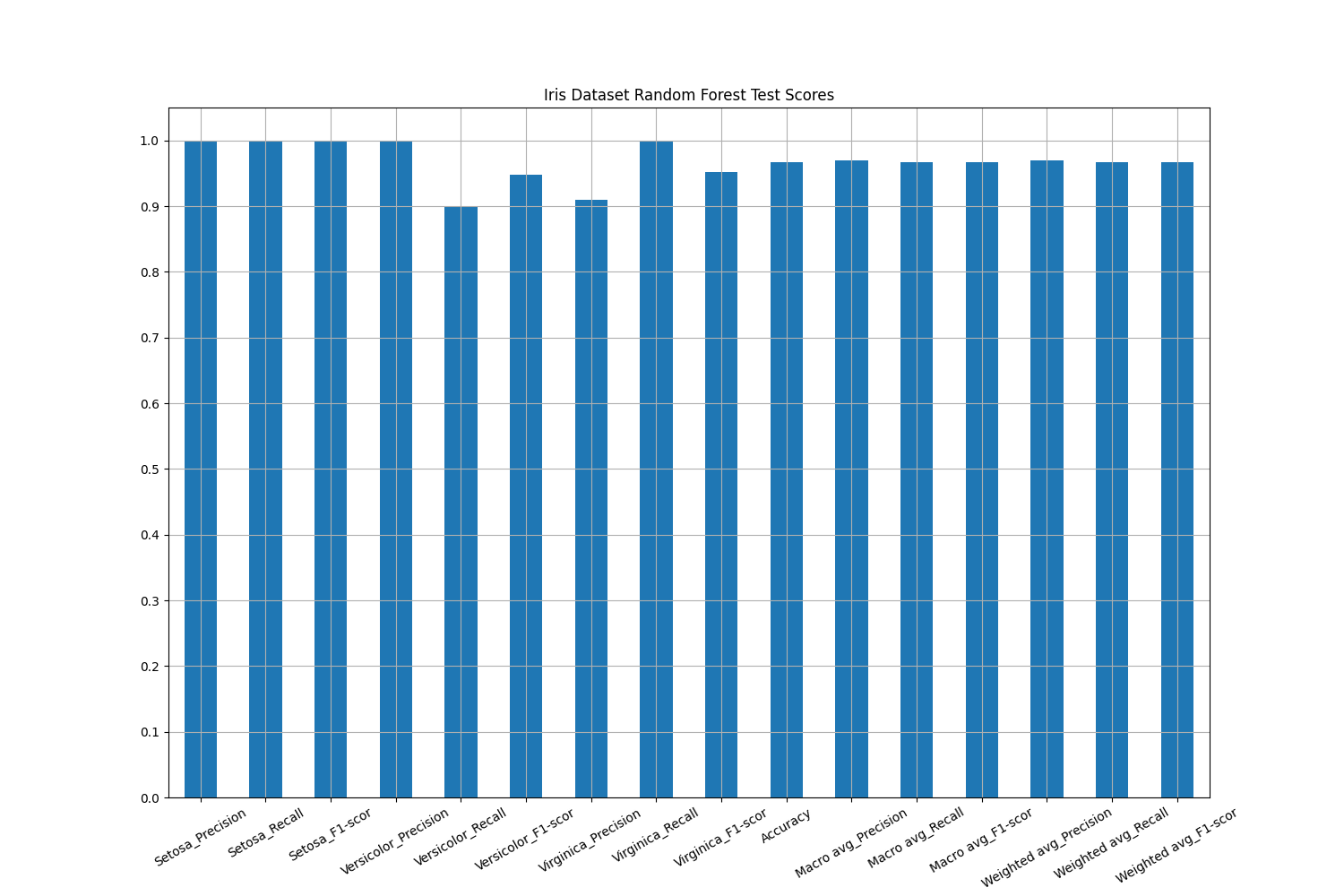
-
report()
-
class
orthrus.core.pipeline.Score(process: Callable, pred_attr: Union[str, list], process_name: str = None, parallel: bool = False, verbosity: int = 1, score_args: dict = {}, pred_type: str = 'class_labels', sample_weight_attr: str = None, infer_class_labels_on_output: bool = True, classes: list = None)¶ Bases:
orthrus.core.pipeline.ProcessProcesssubclass used to score classification and regression results.- Parameters
process (Callable) – The function used to score the classification results.
process_name (str) – The common name assigned to the
process.parallel (bool) –
Flag indicating whether or not to use ray’s parallel processing. Default is False.
ray.init()must be called to initiate the ray cluster before any running can be done.verbosity (int) – Number indicating the level of verbosity, i.e., text output to console to the user. The higher the verbosity the larger the text output. Default is 1, indicating the standard text output with a
Processinstance.score_args (dict) – Keyword arguments passed to
Score.process().pred_type (str) – Can be either “class_labels”, “class_scores”, “reg_scores”, currently. It indicates the type predictions made, i.e., classification labels, classification scores, or regression scores. The default is “class_labels”.
sample_weight_attr (str) – Attribute in the metadata of the dataset you wish to weight the scores by, e.g., misclassifying a sick sample might be more costly than misclassifying a healthy sample.
infer_class_labels_on_output (bool) – If
Truethe process will attempt to assign labels to the output score. For example if one uses a confusion matrix the process will attempt to assign the class labels given inScore.classesto the rows and columns for indexing.classes (list) – Classes used for classification labels. You can provide a subset of classification labels to look at scores relative to fewer classes. The default is None.
-
process¶ The function used to score the classification results.
- Type
Callable
-
parallel¶ Flag indicating whether or not to use ray’s parallel processing. Default is False.
ray.init()must be called to initiate the ray cluster before any running can be done.- Type
bool
-
verbosity¶ Number indicating the level of verbosity, i.e., text output to console to the user. The higher the verbosity the larger the text output. Default is 1, indicating the standard text output with a
Processinstance.- Type
int
-
score_args¶ Keyword arguments passed to
Score.process().- Type
dict
-
pred_type¶ Can be either “class_labels”, “class_scores”, “reg_scores”, currently. It indicates the type predictions made, i.e., classification labels, classification scores, or regression scores. The default is “class_labels”.
- Type
str
-
_sample_weight_attr¶ Attribute in the metadata of the dataset you wish to weight the scores by, e.g., misclassifying a sick sample might be more costly than misclassifying a healthy sample.
- Type
str
-
_infer_class_labels_on_output¶ If
Truethe process will attempt to assign labels to the output score. For example if one uses a confusion matrix the process will attempt to assign the class labels given inScore.classesto the rows and columns for indexing.- Type
bool
-
_classes¶ Classes used for classification labels. You can provide a subset of classification labels to look at scores relative to fewer classes. The default is None.
- Type
list
-
run_status_¶ Indicates whether or not the process has finished. A value of 0 indicates the process has not finished, a value of 1 indicated the process has finished.
- Type
int
-
results_¶ The results of the run process. The keys of the dictionary indicates the batch results for a given batch. For each batch there is a dictionary of results with keys indicating the result type, e.g, training/validation/test labels (
tvt_labels), classification labels (class_labels), etc… AScoreinstance, after it runs, outputs the following results per batch:class_pred_scores (Series): Scores generated by
Score.processon classification results generated byClassify. The index of theSeriesis given by the labels inbatch['tvt_labels'], e.g., “Train”, “Valid”, “Test”. The values of theSeriesare the associated scores for each sample type: “Train”, “Valid”, “Test”.reg_pred_scores (Series): Scores generated by
Score.processon regression results generated byRegress. The index of theSeriesis given by the labels inbatch['tvt_labels'], e.g., “Train”, “Valid”, “Test”. The values of theSeriesare the associated scores for each sample type: “Train”, “Valid”, “Test”.
- Type
dict of dicts
Examples
>>> # imports
>>> import os
>>> from orthrus.core.pipeline import Score, Classify, Partition
>>> from sklearn.ensemble import RandomForestClassifier as RFC
>>> from sklearn.model_selection import StratifiedShuffleSplit
>>> from sklearn.metrics import balanced_accuracy_score
>>> from orthrus.core.dataset import load_dataset
...
>>> # load dataset
>>> ds = load_dataset(os.path.join(os.environ['ORTHRUS_PATH'],
...                                'test_data/Iris/Data/iris.ds'))
...
>>> # define 80-20 train/test partition
>>> shuffle = Partition(process=StratifiedShuffleSplit(n_splits=1,
...                                                    random_state=113,
...                                                    train_size=.8),
...                     process_name='80-20-tr-tst',
...                     verbosity=1,
...                     split_attr ='species',
...                     )
...
>>> # define random forest classify process
>>> rf = Classify(process=RFC(),
...                process_name='RF',
...                class_attr='species',
...                verbosity=1)
...
>>> # define balance accuracy score process
>>> bsr = Score(process=balanced_accuracy_score,
...             process_name='bsr',
...             pred_attr='species',
...             verbosity=2)
...
>>> # run partition and classification processes
>>> ds, results_0 = shuffle.run(ds)
>>> ds, results_1 = rf.run(ds, results_0)
...
>>> # carry over tvt_labels, use Pipeline for chaining processes instead!
>>> [results_1[batch].update(results_0[batch]) for batch in results_1]
...
>>> # score classification results
>>> ds, results = bsr.run(ds, results_1)
-----------
bsr scores:
Train: 100.00%
Test: 96.67%
-
condense_scores() → dict¶ Condenses scores a dictionary of dataframes which contains scores for split types.
-
run(ds: orthrus.core.dataset.DataSet, batch_args: dict = None) → Tuple[orthrus.core.dataset.DataSet, dict]¶ The primary run method. This method calls a sub-classes
_runmethod ondswith keyword arguments given bybatch_args[batch]internally, but takes care of all the boiler plate code for running the process across multiple batches in serial or parallel. It collects all of the results across batches into a dictionary.- Parameters
ds (DataSet) – The dataset to process.
batch_args (dict) – A dictionary with keys given by batch. Each value in the dictionary is a dictionary of keyword arguments to a sub-classes
_runmethod. A keyword argument may indicate the training/test labels for that batch, or classification labels for that batch, or a batch-specific transform to apply tods. Note: Batches should be specified bybatch_0,batch_1, … ,batch_0_0,batch_0_0, etc if you want to link your processes in aPipelineinstance, In particularbatch_0_1is considered a derivative batch ofbatch_0and will inherit if possible batch specific transforms, labels, etc… frombatch_0.
- Returns
The first argument is the object
dsand the second argument isProcess.results_- Return type
Tuple[DataSet, dict]
-
class
orthrus.core.pipeline.Transform(process: object, process_name: str = None, parallel: bool = False, verbosity: int = 1, retain_f_ids: bool = False, vardata: pandas.core.frame.DataFrame = None, new_f_ids: list = None, fit_handle: str = 'fit', transform_handle: str = 'transform', fit_transform_handle: str = 'fit_transform', supervised_attr: str = None, fit_args: dict = {}, prefit: bool = False, transform_args: dict = {})¶ Bases:
orthrus.core.pipeline.FitFitsubclass used to transform a dataset, e.g. normalization, imputation, log transformation, etc…- Parameters
process (object) – Object to tranform the data with, see for example this packages implementation of multi-dimensional scaling:
MDS.process_name (str) – The common name assigned to the
process.parallel (bool) –
Flag indicating whether or not to use ray’s parallel processing. Default is False.
ray.init()must be called to initiate the ray cluster before any running can be done.verbosity (int) – Number indicating the level of verbosity, i.e., text output to console to the user. The higher the verbosity the larger the text output. Default is 1, indicating the standard text output with a
Processinstance.supervised_attr (str) – Supervision attribute in the dataset’s metadata to fit with respect to.
fit_handle (string) – Name of
fitmethod used byTransform.process. Default is “fit”.fit_args (dict) – Keyword arguments passed to
process.fit().prefit (bool) – If
Truethen the process is assumed to be already fit.transform_handle (str) – Name of
transformmethod used byTransform.process. Default is “transform”.transform_args (dict) – Keyword arguments passed to
process.transform().fit_transform_handle (str) – Name of
fit_transformmethod used byTransform.process. Default is “fit_transform”.retain_f_ids (bool) – Flag indicating whether or not to retain the original feature labels. For example, some transforms may just transform each individual feature and we would like to keep the name of that feature, e.g. log transformation, other transforms will generate latent features which can not be labeled with the orginal feature labels, e.g. PCA, MDS, UMAP, etc… The default is
False.vardata (DataFrame) – Optional replacement variable (feature) metadata in the case that
retain_f_idsisFalse.
-
process¶ Object to tranform the data with, see for example this packages implementation of multi-dimensional scaling:
MDS.- Type
object
-
parallel¶ Flag indicating whether or not to use ray’s parallel processing. Default is False.
ray.init()must be called to initiate the ray cluster before any running can be done.- Type
bool
-
verbosity¶ Number indicating the level of verbosity, i.e., text output to console to the user. The higher the verbosity the larger the text output. Default is 1, indicating the standard text output with a
Processinstance.- Type
int
-
supervised_attr¶ Supervision attribute in the dataset’s metadata to fit with respect to.
- Type
str
-
_fit_handle¶ Name of
fitmethod used byTransform.process. Default is “fit”.- Type
string
-
fit_args¶ Keyword arguments passed to
process.fit().- Type
dict
-
prefit¶ If
Truethen the process is assumed to be already fit.- Type
bool
-
_transform_handle¶ Name of
transformmethod used byTransform.process. Default is “transform”.- Type
str
-
transform_args¶ Keyword arguments passed to
process.transform().- Type
dict
-
_fit_transform_handle¶ Name of
fit_transformmethod used byTransform.process. Default is “fit_transform”.- Type
str
-
retain_f_ids¶ Flag indicating whether or not to retain the original feature labels. For example, some transforms may just transform each individual feature and we would like to keep the name of that feature, e.g. log transformation, other transforms will generate latent features which can not be labeled with the orginal feature labels, e.g. PCA, MDS, UMAP, etc… The default is
False.- Type
bool
-
vardata¶ Optional replacement variable (feature) metadata in the case that
retain_f_idsisFalse.- Type
DataFrame
-
new_f_ids¶ New list of feature ids to replace to original feature ids. Optional.
- Type
list
-
run_status_¶ Indicates whether or not the process has finished. A value of 0 indicates the process has not finished, a value of 1 indicated the process has finished.
- Type
int
-
results_¶ The results of the run process. The keys of the dictionary indicates the batch results for a given batch. For each batch there is a dictionary of results with keys indicating the result type, e.g, training/validation/test labels (
tvt_labels), classification labels (class_labels), etc… ATransforminstance, after it runs, outputs the following results per batch:transform (Callable): Bound method calling
Transform.process.transform()which is trained on training data inresults_[batch]['tvt_labels']if it is given, otherwise it is trained on all of the data. The bound method can be used to transform future datasets, see the example below.transformer (object): The fit transformer generated from
Transform.process.
- Type
dict of dicts
Examples
>>> # imports
>>> import os
>>> from orthrus.core.pipeline import Transform
>>> from orthrus.manifold.mds import MDS
>>> from orthrus.core.dataset import load_dataset
...
>>> # load dataset
>>> ds = load_dataset(os.path.join(os.environ['ORTHRUS_PATH'],
...                                'test_data/Iris/Data/iris.ds'))
...
>>> # define MDS embedding
>>> mds = Transform(process=MDS(n_components=3),
...                 transform_handle=None,
...                 process_name='mds',
...                 verbosity=1)
...
>>> # run process
>>> ds, results = mds.run(ds)
...
>>> # use resulting transform
>>> transform = results['batch']['transform']
>>> ds_new = transform(ds)
...
>>> # print results
>>> print(ds_new.data)
---------------------------------
        mds_0     mds_1     mds_2
0   -2.684206  0.326609  0.021512
1   -2.715399 -0.169557  0.203523
2   -2.889819 -0.137346 -0.024710
3   -2.746437 -0.311124 -0.037674
4   -2.728593  0.333925 -0.096229
..        ...       ...       ...
145  1.944017  0.187415 -0.179303
146  1.525663 -0.375021  0.120637
147  1.764046  0.078520 -0.130784
148  1.901629  0.115877 -0.722873
149  1.389666 -0.282887 -0.362318
_
[150 rows x 3 columns]
-
transform(ds: orthrus.core.dataset.DataSet) → dict¶ Transforms the dataset
dsfor every transform contained withinTransform.results_.- Parameters
ds (DataSet) – The dataset to transform.
- Returns
The keys indicate the batch in
Transform.results_and the values are the transformed datasets given byTransform.results_[batch]['transform'](ds).- Return type
dict
-
orthrus.core.pipeline.compose(funcs: Tuple[Callable, …])¶ This function takes a tuple of functions \((f_1,\ldots,f_n)\) and returns their composition \(f = f_1\circ\cdots\circ f_n\).
- Parameters
funcs (tuple of Callable) – Tuple of functions to be composed.
- Returns
Composition of the above tuple of functions.
- Return type
Callable